Color Mixer
Blend two colors together at any ratio. See the mixed result instantly with HEX, RGB, and HSL values.
Best for: Blending two brand colours to find a midpoint for a hover state, and mixing at a set ratio to build a transitional shade
Limitations: Mixes two colours at a time in RGB space, so it will not produce a full palette or blend more than a pair at once
Best suited for: Front-end developers building hover and active states from an existing brand pair
How the Mixer Blends Two Colors
Choose Color A and Color B with the pickers or as six-digit hex, then move the slider, which sets how much of Color B goes in. The tool's code (mixColors) does one thing: for red, green and blue separately it takes A + (B - A) × ratio and rounds to a whole number. The result shows as HEX, RGB and HSL, and the Mix Steps row shows 10, 25, 50, 75 and 90 percent of B.
That is an average of sRGB numbers. The mixer does not model light, paint or pigment, and it has no HSL or Oklab mode. That makes it predictable for hover states and midpoints between two brand colors: the same inputs always give the same hex. When a midpoint of two distant hues looks gray, compare the sRGB and Oklab gradient midpoints, which go muddy for the same reason.
One Pair, Three Mixing Models
Gold #FFD700 and blue #1E90FF, mixed three ways and computed with this site's own code (method). Only the first row is what this mixer outputs.
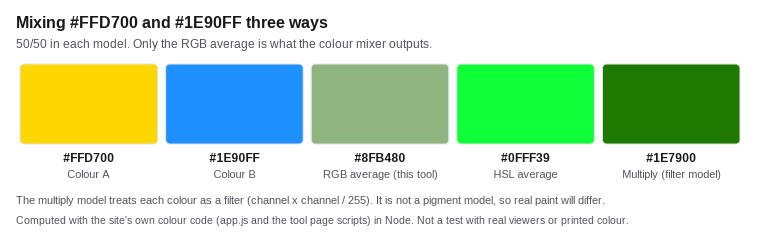
| Model | 50/50 result | What is averaged |
|---|---|---|
| RGB average (this tool) | #8FB480 | Red, green and blue channel values |
| HSL average | #0FFF39 | Hue 51 and 210 the short way round, saturation 100 and 100, lightness 50 and 56 |
| Multiply | #1E7900 | Nothing: channels are multiplied, like two filters laid on each other |
| Percent of B | 10 | 25 | 50 | 75 | 90 |
|---|---|---|---|---|---|
| This tool | #E9D01A | #C7C540 | #8FB480 | #56A2BF | #3597E6 |
The RGB average lands between the two sets of channels, a muted sage. The HSL average keeps both full saturations and picks a hue between gold and blue, so it jumps to a vivid green. Multiply keeps only what both filters pass: gold has no blue channel, so blue falls to 0 and the result is a dark green. That makes multiply a filter model, not a pigment model, and this mixer is not a paint simulator.