How We Test Our Colour Tools
The numbers on our tool pages and in the figures below come from scripts that run the tools' own code. They are arithmetic and rendering checks. Nobody looked at these colours on a calibrated screen, printed them, or asked people what they could read. This page says exactly what was run and what that leaves out.
Method
- Same code as the tools. A script cuts the colour functions out of the site's
app.jsand the tool pages (conversion, contrast, tint and shade, mixing, palette rules, random colour, nearest name, colour blindness simulation) and runs them unchanged in Node.js 24.14.0. If a tool changes, the numbers change. - Browser checks. Headless Chromium 148.0.7778.96, driven by playwright-core 1.65.0, rendered real CSS gradients and ran a test logo through the image colour picker page. pngjs 7.0.0 read the pixels.
- One extra formula. Oklab, from Björn Ottosson's 2020 definition, is used for the gradient comparison and colour distances, because none of our tools computes Oklab.
Formulas
Contrast. WCAG 2.2 defines relative luminance as L = 0.2126 R + 0.7152 G + 0.0722 B, where each channel is first divided by 255 and linearised (x / 12.92 at or below 0.04045, otherwise ((x + 0.055) / 1.055)2.4), and the contrast ratio as (L1 + 0.05) / (L2 + 0.05). Our app.js still uses the older threshold 0.03928. WCAG notes the change "has no practical effect", and our check found that none of the 256 possible 8-bit channel values falls between the two thresholds, so every ratio comes out the same. Ratios are rounded to two decimals, as the tools display them.
Lightness is not luminance. HSL lightness is the average of the largest and smallest channel. It says nothing about how bright a colour looks:
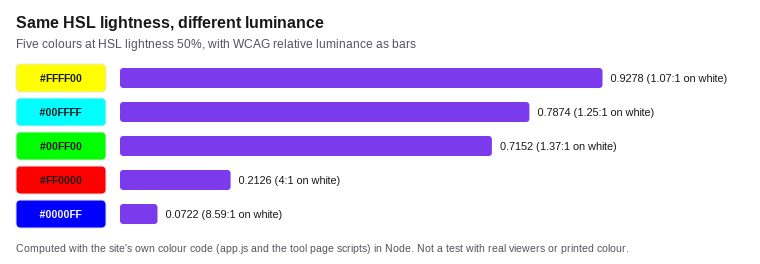
| Colour | HSL lightness | Relative luminance | On white | On black |
|---|---|---|---|---|
#FFFF00 | 50% | 0.9278 | 1.07:1 | 19.56:1 |
#00FFFF | 50% | 0.7874 | 1.25:1 | 16.75:1 |
#00FF00 | 50% | 0.7152 | 1.37:1 | 15.3:1 |
#FF0000 | 50% | 0.2126 | 4:1 | 5.25:1 |
#0000FF | 50% | 0.0722 | 8.59:1 | 2.44:1 |
Results
All examples start from #7C3AED, the purple this site uses for links and buttons.
Tint and shade scale
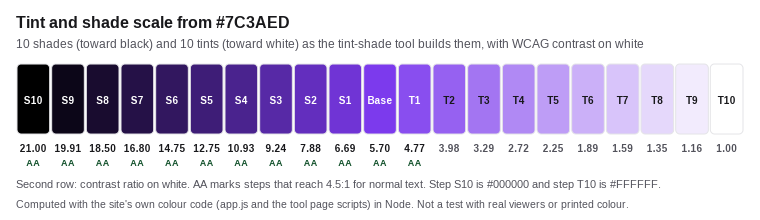
The tint and shade generator moves each channel a fixed share of the way to white or black. Ten equal steps:
| Step | Tint | On white | Shade | On white |
|---|---|---|---|---|
| 1 (10%) | #894EEF | 4.77 | #7034D5 | 6.69 |
| 2 (20%) | #9661F1 | 3.98 | #632EBE | 7.88 |
| 3 (30%) | #A375F2 | 3.29 | #5729A6 | 9.24 |
| 4 (40%) | #B089F4 | 2.72 | #4A238E | 10.93 |
| 5 (50%) | #BE9DF6 | 2.25 | #3E1D77 | 12.75 |
| 6 (60%) | #CBB0F8 | 1.89 | #32175F | 14.75 |
| 7 (70%) | #D8C4FA | 1.59 | #251147 | 16.8 |
| 8 (80%) | #E5D8FB | 1.35 | #190C2F | 18.5 |
| 9 (90%) | #F2EBFD | 1.16 | #0C0618 | 19.91 |
| 10 (100%) | #FFFFFF | 1 | #000000 | 21 |
The base is 5.70:1 on white. Equal mixing steps are not equal contrast steps: the first shade adds about 1 to the ratio, the ninth about 1.4, and the tenth step of each scale is pure white or pure black.
Gradient midpoint: sRGB vs Oklab
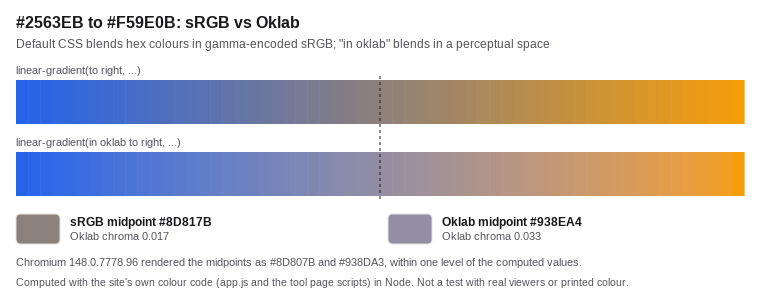
| CSS | Midpoint computed | Midpoint rendered | Oklab chroma |
|---|---|---|---|
linear-gradient(to right, #2563EB, #F59E0B) | #8D817B | #8D807B | 0.017 |
linear-gradient(in oklab to right, #2563EB, #F59E0B) | #938EA4 | #938DA3 | 0.033 |
CSS Color 4 says hex, named, rgb(), hsl() and hwb() colours interpolate "in gamma-encoded sRGB space" by default, which is why the plain gradient passes through grey. Both midpoints are low in chroma for this nearly opposite pair; Oklab keeps about twice as much.
Mixing one pair three ways
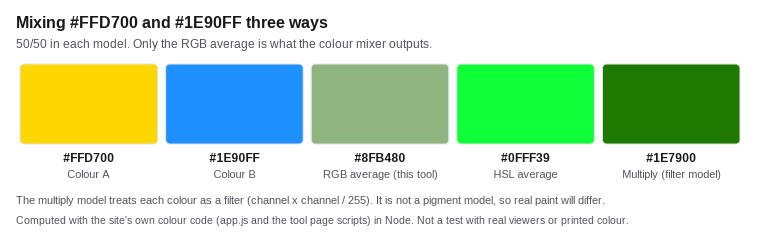
The colour mixer averages the red, green and blue values. Averaging hue, saturation and lightness instead, going the short way round the hue circle, gives a far more saturated green. Multiplying the channels, a simple model of two filters laid on each other, gives a dark green closer to what people expect from blue and yellow paint, but it is still not a pigment model, so real paint will differ.
Harmonies
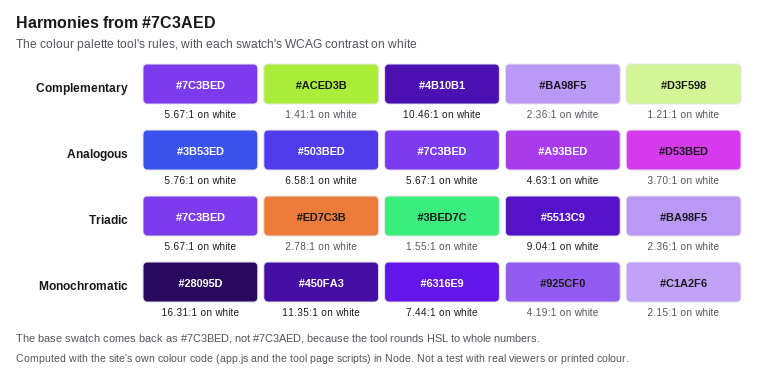
The palette generator converts to HSL, rotates the hue, and converts back with whole-number HSL values. That rounding is why its base swatch is #7C3BED rather than #7C3AED.
Colour vision deficiency simulation
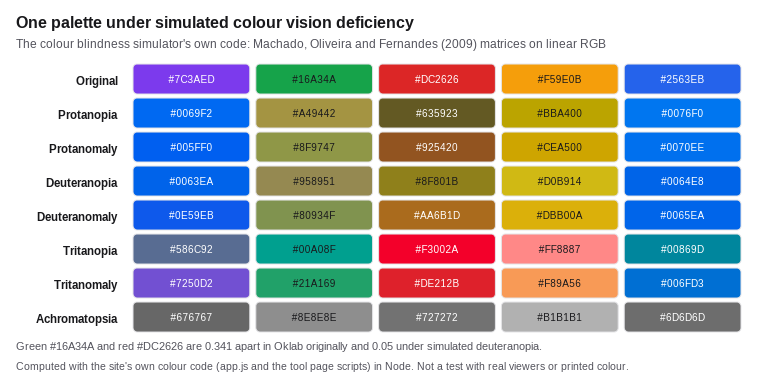
The simulator uses the matrices from Machado, Oliveira and Fernandes (2009), at severity 1.0 for the three dichromacies and 0.6 for the anomalous forms, and applies them to linearised sRGB values. The paper's project page does not state whether the RGB values should be linear; that is our implementation's choice. Achromatopsia is shown as relative luminance only. Limits: the model describes typical cases of each type, real people vary in severity, and the output is only as accurate as the screen showing it.
As a check of what it shows: green #16A34A and red #DC2626 are 0.341 apart in Oklab, but 0.05 apart once both are simulated for deuteranopia.
Recovering a logo's colours
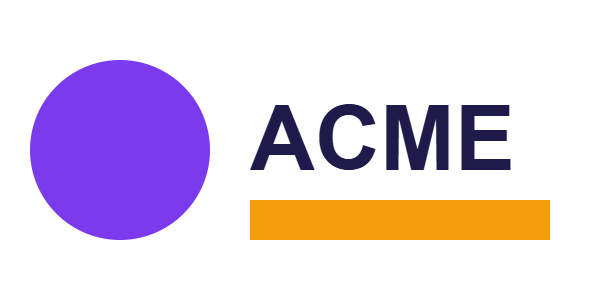
| File loaded into the picker | Clicked circle centre | Clicked just inside the edge | Dominant colours listed |
|---|---|---|---|
| PNG, 600 px | #7C3AED | #7C3AED | #FFFFFF #8040E0 #FFA000 #202040 #E0E0E0 |
| JPEG, quality 0.9 | #7B3AEC | #7344C6 | #FFFFFF #8040E0 #FFA000 #202040 #FFFFE0 |
| JPEG, quality 0.6 | #7C3BEF | #7144BD | #FFFFFF #8040E0 #FFA000 #202040 #8040FF |
| PNG, 1600 px (scaled to 800) | #7C3AED | #7C3AED | #FFFFFF #8040E0 #FFA000 #202040 #FFE0A0 |
Clicking returns the exact pixel. The dominant colour list rounds every channel to a multiple of 32, so it shows #8040E0, never the real #7C3AED.
Rounding between formats
Our converters show HSL and CMYK as whole numbers. Of 2,396,746 colours tested (every seventh 24-bit colour), 89.2 percent did not convert back to the same hex from whole-number HSL, by up to 4 levels in one channel, and 87.3 percent did not survive whole-number CMYK. #7C3AED becomes hsl(262, 83%, 58%), which converts back to #7C3BED.
Rounded contrast ratios
The colour picker shows contrast against white and black rounded to two decimals, with no pass or fail. Of 5,592,406 colours tested (every third 24-bit colour), 3,081 are shown as 4.5:1 or more against white while their unrounded ratio is below 4.5:1. #0071F4 is shown as 4.5:1 but is 4.4983:1, which fails AA for normal text. The contrast checker compares the unrounded ratio, so it reports these pairs as failing.
Palettes in our articles
The script also found 115 hex colours written in the text of 14 articles and computed each one's contrast on white and black. They are in the CSV below.
Tool behaviour checks
On 10 November 2026 we fixed tool bugs found by the checks above, then drove each fixed page in headless Chromium 148 like a user would: typing values, clicking buttons and reading what the page shows and what its copy buttons put on the clipboard.
- Tint and shade export. The CSS export used to write
--color-50as pure white and leave out the 10 to 50 percent tints. It now exports the same 21 colours as the swatches, in the same order, from--color-tint-100(white) through--color-baseto--color-shade-100(black). With#7C3AEDthe check read 21 swatches and 21 variables in matching order, all names different, and both copy buttons copied exactly the preview text. - Gradient stop order. Add Stop puts a new stop at 50 percent at the end of the list, and the CSS used to list it after the 100 percent stop. The CSS now sorts stops by position, keeping list order for equal positions. Three cases were checked: three stops after one Add Stop, five stops with three at 50 percent, and the same five after moving two sliders to 80 and 20 percent. In each, the CSS had the stops in the expected order, the preview's computed gradient matched the CSS, and the Copy button copied the CSS exactly.
- Random colour. The Light, Dark, Saturated and Pastel filters drew the hue with
rand(0, 360). Hue 360 is the same as hue 0, so hue 0 had twice the chance of any other hue. They now draw 0 to 359. A script wraps the page's ownrandfunction: each of the four filters now asks for 0 to 359, which covers 360 hues once each, and in 100,000 draws of Light hue 0 came up 264 times against an average of 277.8 for the other hues (290 against 277.7 for Dark). The Any filter could never return pure white because it multiplied by 16,777,215; it now multiplies by 16,777,216, so#FFFFFFis as likely as any other colour. Warm (hues 0 to 60) and Cool (180 to 260) do not wrap round the circle and were unchanged. The contrast table on the tool page was recomputed from new draws. - Image colour picker. After the first image the drop zone was hidden, so a second image needed a page reload, and a click on the very edge of the canvas could read a point outside the image, which came back as
#000000. The page now has a Load another image button, clears the file input after each load so the same file can be chosen again, and keeps the sampled pixel inside the image. The check loaded the test logo, then a 300 by 200 PNG with four flat quadrants (#10B981,#F43F5E,#3B82F6,#F59E0B), then the quadrant file again, then the logo, all without reloading, at 1280 and 375 pixels wide. Every load replaced the image and its dominant colours, and clicks on the four exact corners of the quadrant image returned the four corner colours. Run against the old live page the same way, there was no way to load the second image and three of the four corner clicks on the logo returned#000000instead of white. The logo results in the table above did not change. - Colour names. The colour picker used its own 94-entry list in
app.js, with spaced names and two names that are not CSS keywords (Royal Purple and Amethyst), while the colour name finder used the 141 CSS names. The 141-name list and its nearest-name function now live inapp.jsand both pages use them. The check typed 311 colours into both pages (11 fixed examples, including#7851A9and#9966CC, plus 300 from a fixed pseudo-random sequence): both pages showed the same name for all 311, and the name finder's grid still lists 141 names. On the old live pages the same 311 colours gave a differently written name every time, and for 101 of them a different colour name altogether.
What is not tested
- No people. Contrast ratios are the WCAG arithmetic, not measured readability.
- No printed colour. Screen colours do not map exactly to ink, and the CMYK values are a simple formula, not a printer profile.
- No monitor calibration or other devices. Everything was computed or rendered in one headless browser.
- Simulated colour vision deficiency is a model, not what any particular person sees.