Tint and Shade Generator
Generate 10 tints and 10 shades of any color. Click any swatch to copy. Export all 21 colors as CSS variables.
Best for: Building a ten step tint and shade scale from one brand colour, and generating the lighter and darker variants a design system needs
Limitations: Produces tints and shades only (no tones) by mixing one colour with white or black in RGB, and copies CSS variables to the clipboard rather than pushing them into a design tool
Best suited for: Designers building a consistent colour scale from one approved brand hex
How the Steps Are Calculated
Enter a hex code or use the picker. For tint step k (1 to 10), the code (generateTints) moves each red, green and blue value toward 255 by k tenths: c + (255 - c) × k/10, rounded. Shades (generateShades) scale each value toward 0: c × (1 - k/10). The tints row runs from lightest to the base, the shades row from the base to darkest, and step 10 is always pure white or pure black. Click a swatch to copy its hex.
A Worked Scale From #7C3AED
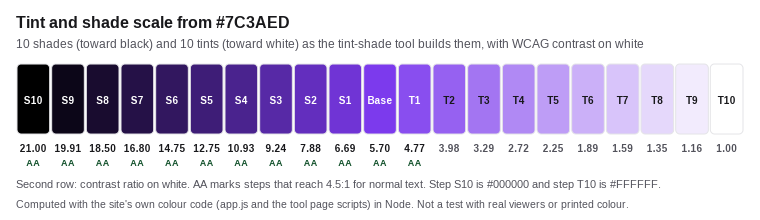
All 20 steps with their contrast ratio on white, computed with this site's own code (method):
| Step | Tint | On white | Shade | On white |
|---|---|---|---|---|
| 0 (base) | #7C3AED | 5.70 | #7C3AED | 5.70 |
| 1 (10%) | #894EEF | 4.77 | #7034D5 | 6.69 |
| 2 (20%) | #9661F1 | 3.98 | #632EBE | 7.88 |
| 3 (30%) | #A375F2 | 3.29 | #5729A6 | 9.24 |
| 4 (40%) | #B089F4 | 2.72 | #4A238E | 10.93 |
| 5 (50%) | #BE9DF6 | 2.25 | #3E1D77 | 12.75 |
| 6 (60%) | #CBB0F8 | 1.89 | #32175F | 14.75 |
| 7 (70%) | #D8C4FA | 1.59 | #251147 | 16.80 |
| 8 (80%) | #E5D8FB | 1.35 | #190C2F | 18.50 |
| 9 (90%) | #F2EBFD | 1.16 | #0C0618 | 19.91 |
| 10 (100%) | #FFFFFF | 1.00 | #000000 | 21.00 |
Equal channel steps are not equal contrast steps. The first tint drops the ratio by 0.93 (5.70 to 4.77) and the last by 0.16 (1.16 to 1.00). The first shade adds 0.99; the ninth adds 1.41. At the dark end neighbors nearly merge: steps 8, 9 and 10 differ from the step before by only 1.10, 1.08 and 1.05 to 1. If a scale looks bunched at one end, skip steps there rather than using all ten.
Against the WCAG 2.2 minimum of 4.5:1 for normal text, the base, tint 1 and every shade qualify on white. Tints 2 and 3 reach the 3:1 large text level; tint 4 (2.72) and lighter should not carry text on white. Test any other base in the contrast checker.